Ubuntu

How to Install SSH Server on Linux?

Fadıl

In order to make a remote connection with SSH to your computer where the Linux operating system is installed, you need to have the SSH Server computer installed or you need to install it. In general, SSH Server is already installed, but it is not available on some distributors or the service does not start on its own. This is how we set up the ssh server and start the system how it works automatically, we will see now.

How to Set LigoWave NFT Series Devices in Access Point Mode

Fadıl

To create a simple Access Point (Auto WDS), follow these steps.

Note: NFT series devices require an external DHCP server as they operate in bridge mode by default.

Step 1 – Access Point WDS configuration;

If the device is not connected to a DHCP source, the default IP address is varsayılan “192.168.2.66”.

However, if it is running on a DHCP server, find out which IP address your device receives from your DHCP source and enter the interface settings.

Ubuntu 16.04 Bonding Configuration (Without LACP AND LACP)

Ubuntu 16.04 Bonding Configuration (Without LACP AND LACP)

Fadıl

What is Bonding?

It is the process of joining multiple ethernet interfaces. Network teaming can also be called. In other words, if more than one network card acts as a single network card, if one of the cards is disconnected, it is the process of continuous connection over the other card.

What is LACP?

Ether Channel is performed with two protocols. The first is the cisco protocol PAgP (Port Aggregation Protocol) and the second is the LACP (Link Aggregation Control Protocol) standard protocol with IEEE 802.3ad. Ether Channel is a protocol that allows the switch to detect two or more cables as a single cable when two or more cables are connected between two switches. Ether Channel provides both redundancy, loadbalance, and high bandwidth.

What is NFS (Network File System)? How to Configure NFS Server and User?

What is NFS (Network File System)? How to Configure NFS Server and User?

Fadıl

It is a Unix / Linux file sharing service developed by Sun Microsystems and is a stable technology that enables file sharing between Linux systems.

We need to get into configuration and use it right away. We will work with the Server and Client model in the environment. In other words, we have to configure both the server-side, there are settings that we should not make for the client to use. We will create these applications on the virtual machine.

How to KVM Backup and Restore in Linux

How to KVM Backup and Restore in Linux

Fadıl

By following the steps below, we’ll see how you can upload your KVM virtuals and return them from the backup again.

1. Backup Import

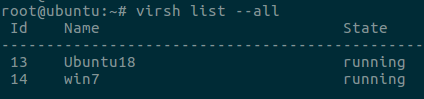
First, let’s list our machines and see that they are operational. To do this, we use the following command.

> virsh list –all

How to KVM Backup and Restore in Linux

Then we close the VM we will install.

> virsh shutdown Ubuntu18

Then let’s list the machines again and see that they are turned off.