Ubuntu

Ubuntu 18.04 PacketTracer7 Setup How to Fix libpng12.so error?

Ubuntu 18.04 PacketTracer7 Setup How to Fix libpng12.so error?

Fadıl

Often after installing PacketTracer 7, we get an error like the one below.

error while loading shared libraries: libpng12.so.0: cannot open shared object file: No such file or directory

Now let’s see how to fix this error.

After downloading the Packet Tracer, open the terminal in the same directory and extract it from the compressed tar.gz file.

sudo tar -zxvf packetracer7.tar.gz

Let’s enter the folder with the files we opened, if we are in the same directory, let’s run the install bash file without doing anything.

How to install Cisco Packet Tracer on ubunt?

Fadıl

The Cisco Packet Tracer’s latest version or desired version is downloaded from the netcad site or you can download it here without having to sign up. (Download for Cisco Packet Tracer 7.2 64-bit Linux) It’s up to you.

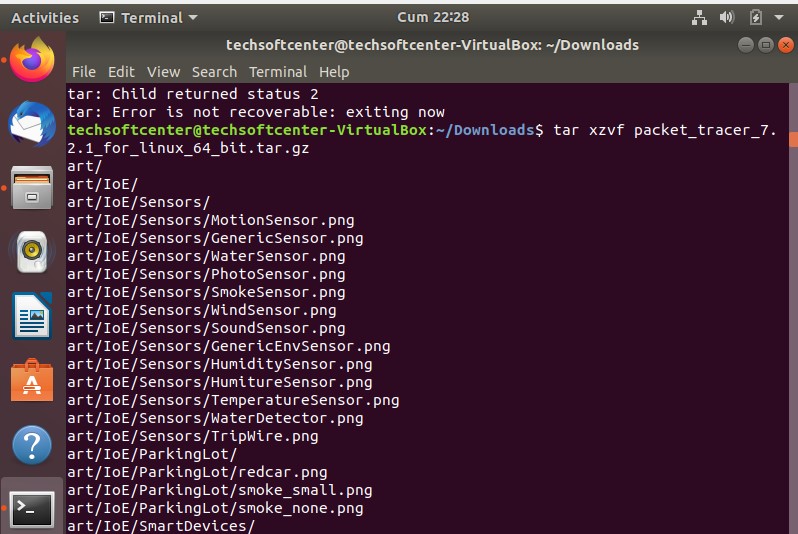
Open the terminal by pressing the keyboard from the Ubuntu Terminal (Ctrl + Alt + t) and extract the tar file:

$ cd ~/Downloads
$ tar xzvf PacketTracer7.2forLinux64bit.tar.gz

packet_tracer_tar

packet_tracer_tar

Start the installation from the tar file we opened. And create a directory. Command for the directory.

How to Configure SSH and Putty on Ubuntu?

How to Configure SSH and Putty on Ubuntu?

Fadıl

SSH (Secure Shell) is a protocol that enables access to devices or servers in another presentation on the network such as Telnet and rlogin. Telnet and rloginprovide connections without encrypting connections, including user passwords, while SSH encrypts all connections with a strong crypto method. For this reason, it is the most preferred method.

In this article, we will see how to install SSH on a machine running Ubuntu operating system.

How To Configure Basic DNS in Linux Operating Systems?

How To Configure Basic DNS in Linux Operating Systems?

Fadıl

In today’s article, we will learn how to do Basic DNS Configuration (dnsmasq) in Linux Operating Systems. For us, “dnsmasq“, which we will use for name resolution in small-scale network structures, will analyze the records we enter in our server’s “/ etc / hosts” file without requiring a very large configuration. will provide the possibility.

Now we will see how this is done in 6 steps.

Step 1. We download and install the “dnsmasq” package from the “yum repository” defined in our operating system

How to Configure DNS and DHCP Server on Linux Operating Systems?

How to Configure DNS and DHCP Server on Linux Operating Systems?

Fadıl

What is DNS?

DNS (Domain Name System) An IP address is provided to go to every web address on the Internet. It is quite difficult and troublesome to keep the IP addresses of these web addresses one by one in our minds.
DNS comes into play here. It gives a name corresponding to the IP of each web address, so the names that are easier to replace than IP addresses are the name of the system that helps us keep in mind. For example techsoftcenter.com (IP value: 172.104.31.121)