Ubnt

Resetting the UniFi Access Point to Factory Settings

Resetting the UniFi Access Point to Factory Settings

Fadıl

In this article, Unifi Reset will try to explain how to restore an UniFi Access Point to factory settings in different ways. I will explain the options of UniFi Network Controller software, SSH and physical reset and reset options. This article applies to all UniFi Access Points models and versions; the position of the reset button on each different model may vary. See the specific Quick Start Guide for each product to find it.

Ubiquiti UAP Adoption Failed

Ubiquiti UAP Adoption Failed

Fadıl

UBNT NETWORKS

In this article, we will examine the Unifi Adoption Failed Problem which is a common problem.

I will talk about the access points that are not adapted to the unifi controller (Unifi Adoption Failed Problem) in Ubnt unifi access points that we frequently encounter in corporate networks.

Normally the Ubnt Unifi access point and controller should be automatically adapted if they are on the same network, but in some cases, it doesn’t adapt if you’re on the same network, even though options such as antivirus and firewall are turned off. (I’m still not able to solve some of the reasons that we are able to make Unshift ssh saves us from this situation.) With ssh, we can perform manual adaptation.

UniFi Update Problem – How to Manual Update Steps for UniFi Devices

UniFi Update Problem – How to Manual Update Steps for UniFi Devices

Fadıl

Ubiquiti Networks’ recent updates for devices on the UniFi platform and the minimum firmware requirements supported by UniFi Controller software (firmware) requirements are not compatible with the firmware version installed on newly purchased devices. and configuration operations cannot be performed directly. In this article, we will talk about the manual update of the Wireless Access Points on the UniFi platform.

Software for Windows Platform;

  • SSH Client: Putty, KiTTY, etc. program,
  • Any program that supports WinSCP  or SCP connection protocol,
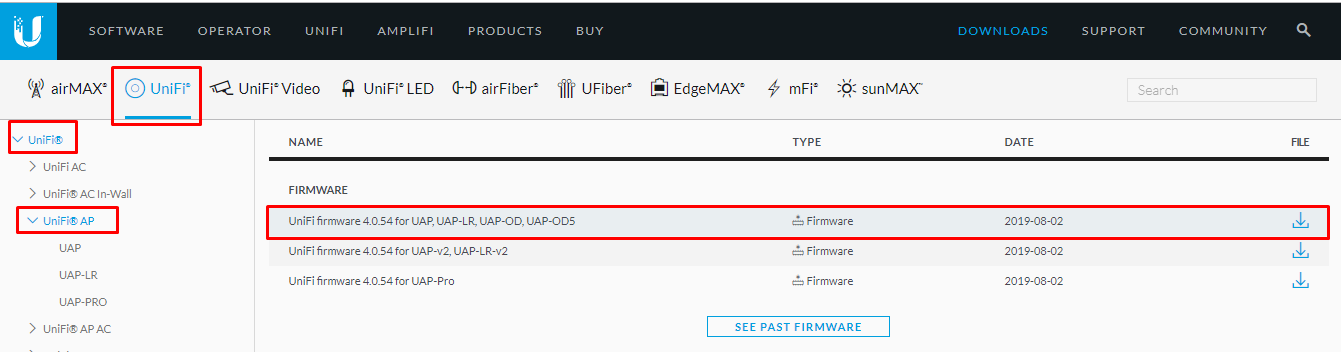
  • Firmware compatible with your UniFi AP can be downloaded here.

Unifi_Update

How do I Reset The Mimosa B5/B5C,B11 and B24 ?

How do I Reset The Mimosa B5/B5C,B11 and B24 ?

Fadıl

Default IP Address

Mimosa backhaul radios can be accessed either via the wired interface or the 2.4 GHz wireless interface (if applicable). An internal bridge connects the two interfaces. Each interface is assigned a default IP address (see table below), and both addresses respond via either interface. The wired interface can either be set manually to a static IP or changed dynamically via DHCP. The wireless interface IP cannot be changed.

UniFi – How to Set Traffic Bandwidth Limits

UniFi – How to Set Traffic Bandwidth Limits

Fadıl

Overview

Readers will learn how to set traffic shaping parameters to manage bandwidth in UniFi networks. Bandwidth management is important to maintain a functional network while preventing traffic işlevsel bottlenecks Bant. UniFi allows operators to set up traffic shaping in the control unit for users. Traffic shaping policies can be applied to groups in Layer-2 (for example, SSID, VLAN), or for individuals (for example, WLAN client 28, WLAN client 99).