Security

WORDPRESS WP-ADMIN SECURITY – WP LOGIN PAGE SECURITY ON APACHE

WORDPRESS WP-ADMIN SECURITY – WP LOGIN PAGE SECURITY ON APACHE

Fadıl

You may be quite bored with the brute-force attacks on the admin page of your WordPress blogs, by default, forbidding the admin panel page to be opened with the wp-admin attachment for everyone will be one of the most logical actions you should take in the name of security.

You can do this simply by installing the plugin by configuring the following configurations.

First we edit the file “nano /etc/httpd/conf/httpd.conf”  with nano. You can choose a different editor.

inetbase DDOS Protection Centos Installation + Setting

Fadıl

Nowadays it is very easy to make DDOS attacks easily at cheap costs. In this respect, we will explain the installation and configuration of inetbase DDoS which provides blocking with inetbasefor a certain number of requests on your virtual servers with centos (if it is apf, it can also be blocked).

Of course, this inetbasecannot block large attacks, but it can block specific requests for your IP with inetbase.

You can install inetbase in all VPS packages in this article!

How to Find Users Who Have Opened a TCP Connection to Your Server on a Certain Number

How to Find Users Who Have Opened a TCP Connection to Your Server on a Certain Number

Finding multiple connections to your server over an IP can always be useful. In many cases, when you receive a DDOS attack, you will see multiple connections over an IP. A command that can be very useful, especially in such a case. For example, you want to list IPs that open more than 50 connections on your server. In this case, you can use the following code;

netstat -n --tcp --udp --numeric-hosts | \
grep -v 127.0.0.1 | \
awk '{if (/(tcp|udp)/) { print $5 }}' | \
sed 's/:.*//' | \
sort | \
uniq -c | \
sort -n | \
awk '{if ($1 > 50) {print "Baglanti Sayisi: "$1"\t"$2; }}'

When you execute the command, you receive an output similar to the following; (Of course, if more than 50 connections are available from a single IP)

How to View Mikrotik Winbox Password

How to View Mikrotik Winbox Password

Fadıl

Forgot Username and Password Mikrotik? Forgot your Username and Password in Winbox Mikrotik? If the answer is yes, then you are in the right place. Because in this article I will discuss How to know your Username and Password Winbox Mikrotik forgotten it.

There are two conditions which we usually forget the password Mikrotik:

1. Forget your Username and Password Winbox Mikrotik that have not been in the save on Winbox

Mikrotik How to Config Kid Control to Manage Your Child

Fadıl

“Kid control” is a parental control feature to limit internet connectivity for LAN devices.

Now, wanna show you about the new feature from Mikrotik is kid control. Kid control is a feature for the parent to manage child for the day/time for those to use the internet not let see.

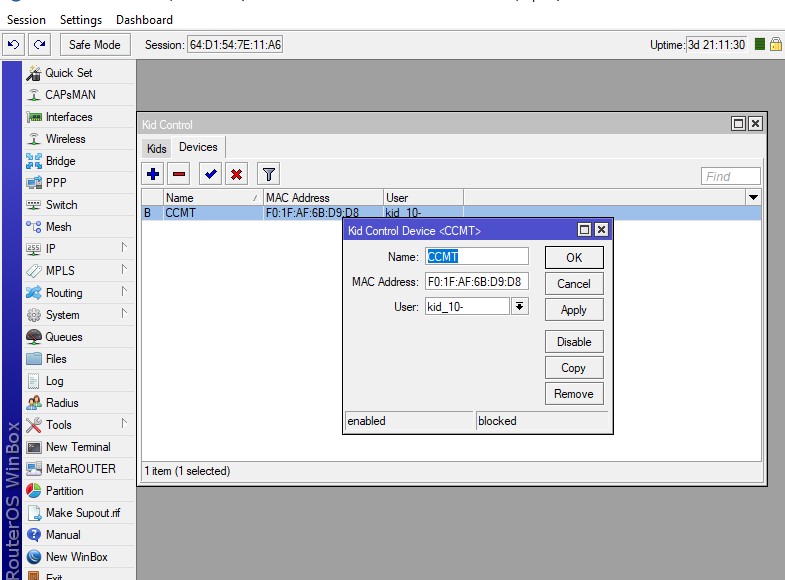
Copy the mac address from the ARP table and paste it to the new kid control device mac address.

Mikrotik How to Config Kid Control to Manage Your Child