Security

How to Prohibit IP Using Windows Firewall on Your Server?

How to Prohibit IP Using Windows Firewall on Your Server?

Fadıl

1) We select Start » Administrative Tools » Windows Firewall With Advanced Security.
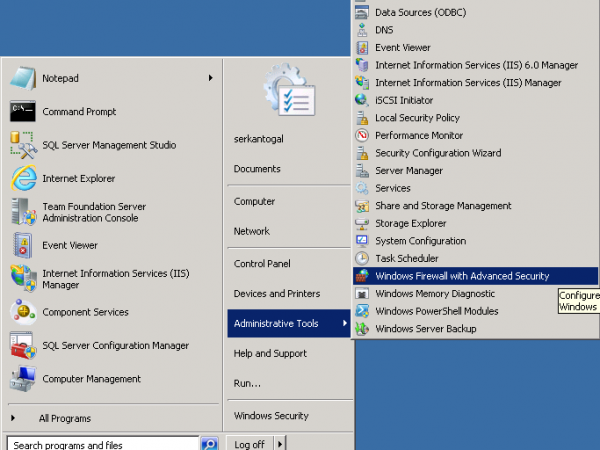
Windows Firewall Width Advanced Security

Windows Firewall Width Advanced Security

2) In the window that opens, we right-click on Inbound Rule and say New Rule.
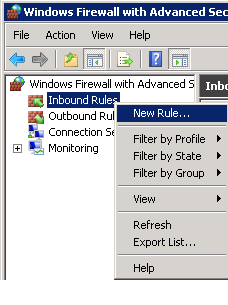
Inbound Rule

Inbound Rule

3) We choose the Custom option from Rule Type.
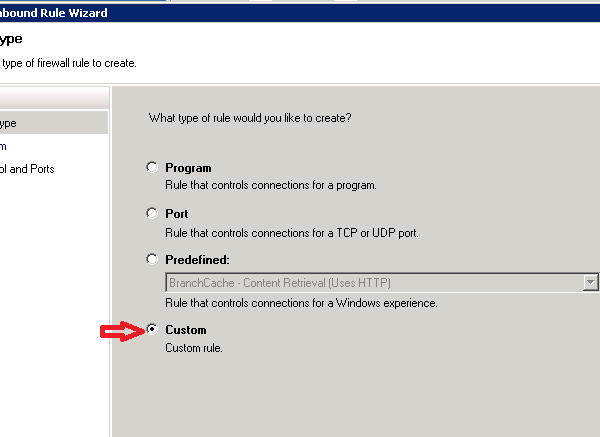
Rule Type

Rule Type

4) We click the Next button and proceed.
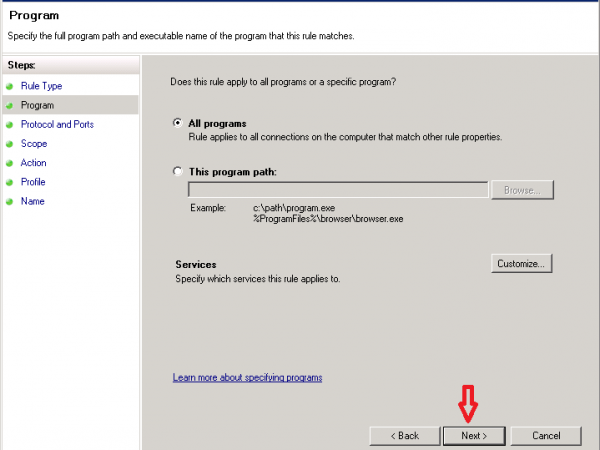
New Inbound Rule Wizard

New Inbound Rule Wizard

How to Should a Strong Password Be?

How to Should a Strong Password Be?

Fadıl

Passwords

DO IT:  Monthly, or as necessary.

This is pretty simple.  Change your passwords and change ‘em often.

An easy way for you to protect your sensitive data and email is to change your passwords on a monthly basis or even more often depending on how frequently you use computers away from home.

If you log on to your email on any remote computer – such as at the library or in cyber cafes – then the possibility exists that the computer could have a key-stroking virus present.

How to Prevent MikroTik Brute Force and Port Scanner Attacks

How to Prevent MikroTik Brute Force and Port Scanner Attacks

Fadıl

By creating dynamic address lists for each relevant port and protocol; SSH, Telnet and Winbox ports to come with the Brute Force attacks on the Internet or local network will prevent future port scans.

In our code structure, Brute Force attacks are prevented by going through four different Stages with one Jump, rule, Level1, Level2, Level3 Tracking list step, and Black List rule, which controls the frequency of connection requests, for each of the SSH, telnet and Winbox rules separately.

Turning off DNS Recursion Features on Linux servers

Fadıl

If DNS Recursion is turned on, you are exposed to the “DNS Amplification Attack”  attacks. This attack is also known as a DNS-powered DDOS attack. For this reason, DNS Recursion should be turned off and we will see how to do this. Assuming you are more or less familiar with the consequences of a DDOS attack, what is DNS Amplification Attack? I leave here a beautiful video explaining the situation without drowning in too much detail.

How to configure IPv4, Grouping and Policy in Fortigate Firewall?

Fadıl

In this article, we will give you some information about how to do routine operations such as IPv4 address creation, grouping, and policy creation on your Fortigate Firewall devices through CLI console.

First you can access the CLI console via the web interface or SSH with Putty.

I want to give you some brief information about the commands first.

The “Config“ command allows you to move to the configuration section.
The “Edit“ command is used to create or edit as needed.
The “Set” command is used to add and configure, IP, add members, etc.
The “Next“ gives you a chance to make a new operation in the corresponding config directory.
The “End“ command is used to exit config. We can start now.