Network

How to Mikrotik User Password Change?

How to Mikrotik User Password Change?

Fadıl

It is important for security to change the password from the Mikrotik default.

So what do we have to do for it?

We can change one from the winbox interface.
The other method can also be changed from the new terminal in winbox.

The user is first added from the system.

Then click Change password.

/password old-password="" new-password="NewPASSWORD" confirm-new-password="NewPASSWORD"

If we want the users we create to enter only from a specific IP address.

Open Ubnt Frequency Range

Open Ubnt Frequency Range

Fadıl

Putty with antenna IP and Port are written. 22 port instead of 443 port on the Router side
It is written. In this way, the antenna is reached.

UBNT UBNT for airOS 8.5 version of airOS

touch/etc / persistent/ ct save save  reboot reboot

UBNT post airOS version 8.5

sed -i 's/\(countrycode=\).*/\1511/g' /tmp/system.cfg && save && reboot

I hope it has been a useful article.

Step-by-Step Installation of Zabbix with Mikrotik

Step-by-Step Installation of Zabbix with Mikrotik

Fadıl

In our article, we will see how to install Zabbix step by step.
1- First you need to install a Linux machine installed on the virtual machine.
2- This is a Zabbix from your own site on the Linux machine <https://www.zabbix.com/download>
download the required file. I have downloaded version 3.2.6 VirtualBox, VMWare (.vmdk) to try it for example.
3- We look at the internet IP of our Mikrotik device, eg via ether 2 below. The reason we learn this is to provide access to our Mikrotik router via Zabbix.

Limiting Users’ Traffic with a Queues on the Mikrotik Router

Limiting Users’ Traffic with a Queues on the Mikrotik Router

Fadıl

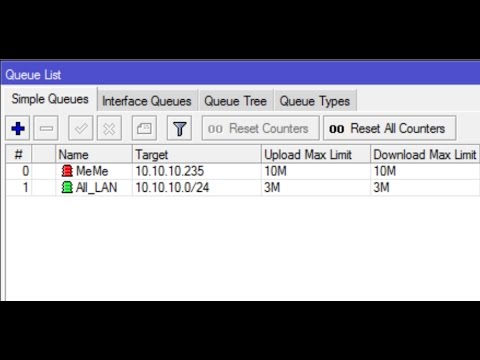
1- As shown in the picture below, we enter the queue part of our Mikrotik device, where we limit the bandwidth of our users.

2- Here, as shown in the picture above, we press the + button, a window appears as follows.

As the picture also appears, we have a user called the Trial and we limit the Internet to 25MB. We have limited both Upload and Download to 20MB. In the Target section, if we give a fixed IP to our user, we limit it via IP. In other words, the user comes to the Internet where the wan leg is coming, whichever is on the internet we choose it.

Your Mikrotik Router How to Increase the Log Data Size?

Your Mikrotik Router How to Increase the Log Data Size?

Fadıl

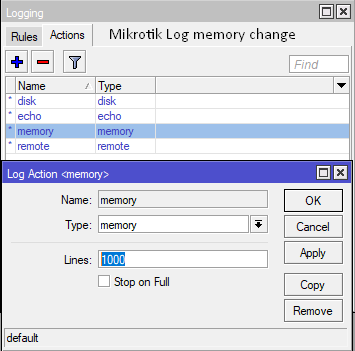
Sometimes you need to look at the logs of the router in order to understand the cause of some malfunctions which also have your router. But we can see that the routers, which are especially dynamic, change snapshots instantly. To better understand, for example, suppose that you provide an internet service provider in a certain region. Here, as seen in the picture section, the default value in Mikrotik devices is limited to 1000 lines. But we Mikrotik from our part of the login device, as well as actions and from there the memory can increase the number of lines, type the number we want instead of 1000. But of course, a very large number of the memory of the device should be careful not to blow up.