Network

How to Create Web Lists That Can Be Accessed Without Login Hotspot

Fadıl

If we use the Mikrotik Hotspot WiFi system, all users who connect to WiFi Hotspot cannot access anything except the hotspot login page itself. After the user login then he can freely access various websites.

Then the question arises, Will the uninstalled hotspot user can access the site/web that we specify? That is the user does not need to login hotspot first to be able to access the certain web. The answer is of course Can.
Product Code Meaning on Mikrotik RouterBoard

Fadıl

Product Code Mikrotik has its own meaning. Sometimes we do not understand about what the purpose of the meaning of the name of the product code on the Mikrotik. Whereas Mikrotik Product Code is very important to know if we wanted to buy Mikrotik devices.

Sample Product Code Mikrotik RB750 , RB751Ui-2HnD, RB951G-2HnD, RB912UAG – 2HPND, RB2011UiAS-IN, CCR1009-8G-1S-1S +, CRS226-24G-2S + RM, etc.

From the example of the product code mikrotik we can know the type, type, device specifications and installation. How do I know what a product code Mikrotik? Let’s discuss together the Tutorial Mikrotik this time.

How to Mikrotik Acces Point?

Fadıl

1-first step

In this article, we will make an example about point-to-point (P2P) connection. We will use the SXT-G-5HPnD.
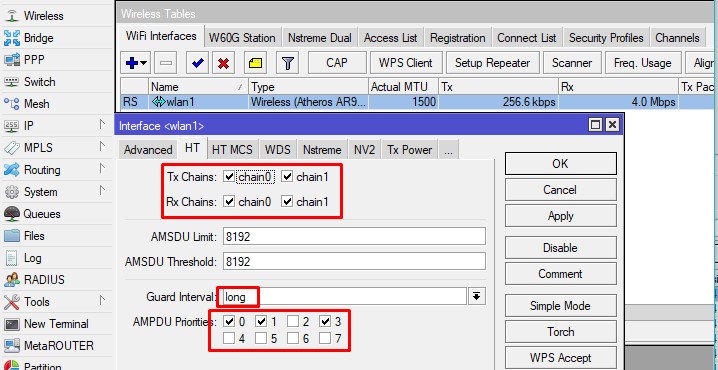
We will display the SXT-G-5HPnD wireless configuration with pictures.

Here we have the Lite configuration as an access point to be an antenna.

2-second step

How to Mikrotik Acces Point?

3-third step

How to Mikrotik Acces Point?

4-fourth step

How to Mikrotik Acces Point?

5-fifth step

How to Mikrotik Acces Point?

How to mikrotik Lite SXT 5 Station Bridge?

Fadıl

1-First step:

In this article, we will make an example of a point-to-point (P2P) connection. We will use SXT-G-5HPnD.
We will display the SXT-G-5HPnD wireless configuration with pictures.

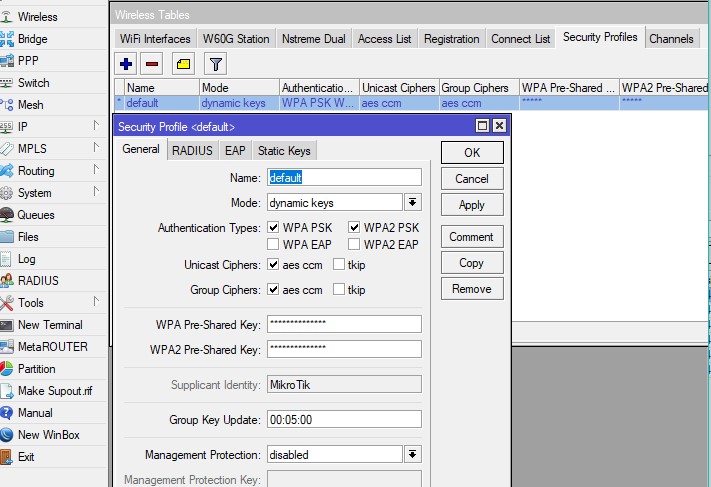
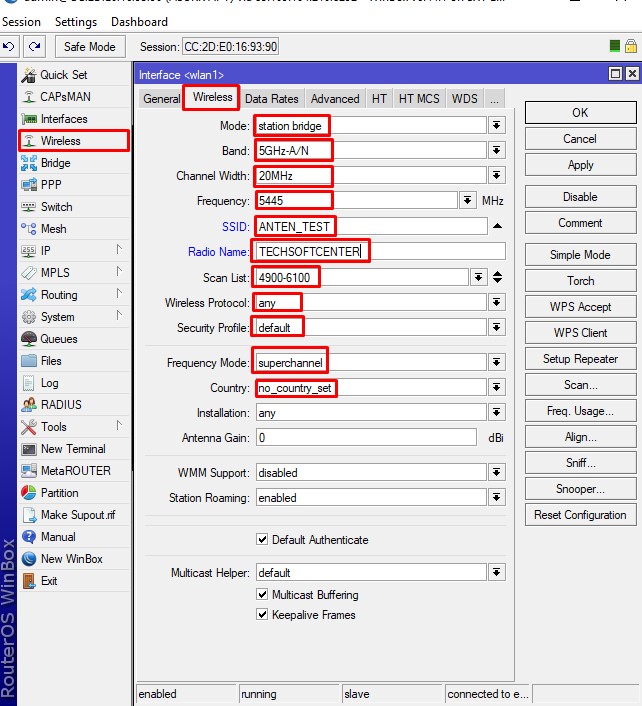
Firstly we are making configurations in WLAN 1 in the wireless tab. If we want to write the wireless settings as script code

/interface wireless
set [ find default-name=wlan1 ] ampdu-priorities=0,1,3 band=5ghz-a/n disabled=no frequency=5445 \ 
frequency-mode=superchannel guard-interval=long mode=station-bridge \
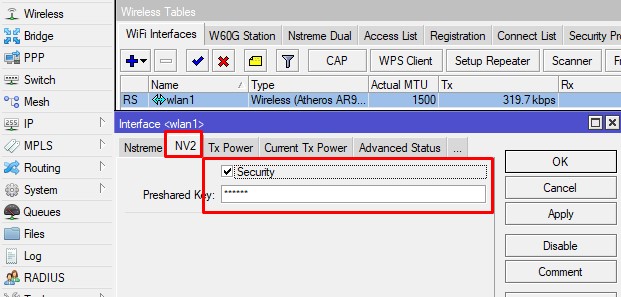
nv2-preshared-key=****** nv2-security=enabled radio-name="test" scan-list=4900-6100 \
ssid=Test_Sektor interface wireless security-profiles
set [ find default=yes ] authentication-types=wpa-psk,wpa2-psk eap-methods="" mode=dynamic-keys \
supplicant-identity=MikroTik wpa-pre-shared-key=password  wpa2-pre-shared-key=password

Mikrotik Wirelles

MIKROTIK: SETUP SQUIDBLACKLIST FIREWALL

MIKROTIK: SETUP SQUIDBLACKLIST FIREWALL

Fadıl

The blacklists were incredibly simple to implement into RouterOS and once configured, the lists can be scheduled to update at regular intervals via the RouterOS system scheduler. Squidblacklist.org provides a list of available blacklists, but make sure to review the blacklist compatibility chart first, before implementing the list into your RouterOS configuration. In addition, you will need to change the “dst-path” value to an existing path for the script to work. If you want to download the blacklist to the root of your MikroTik you can delete the “dst-path” property and its value entirely . Also, make sure that the “in-interface” and “out-interface” property value is set to that of your network environments WAN interface. Should you choose the “All-In-One Firewall/Filter Setup” script (via copy/paste in the MikroTik terminal), you will need to enable the scheduled tasks, since they are disabled by default in the script.