
Network

How to Overcome the “No More Sessions are allowed for User Hotspot Mikrotik”

How to Overcome the “No More Sessions are allowed for User Hotspot Mikrotik”

Fadıl

Login Error Message Hotspot Mikrotik there are many. In his prior articles, we have reviewed the Explanation of Error Message in Mikrotik Hotspot Login page.This time we will discuss one of Message Error during log Hotspot Mikrotik, namely, No More Sessions are allowed for User $ (username).
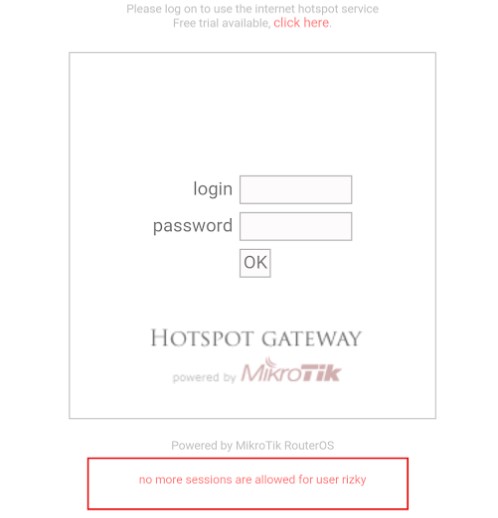
Hotspot Login Page Mikrotik

Hotspot Login Page Mikrotik

Why does the error message no more sessions are allowed for user $ (username) should be discussed?
How to Make Voucher Hotspot Mikrotik via User Manager

Fadıl

Make use Voucher Hotspot Mikrotik User Manager is quite complicated. Many things must be configured to be able to generate Voucher Hotspot Mikrotik Mikrotik in the User Manager. By using a voucher system, we can more easily in selling Internet connection via WiFi Hotspot Mikrotik to customers. We do not need to add the user each time a customer wants to subscribe to a WiFi Hotspot. We stayed to generate username and user password automatically, and print it in the form of vouchers to be sold to customers.

Mikrotik HotSpot User Manager Settings

Fadıl

Setting User Manager with Mikrotik Hotspot – In the previous article has been discussing How to Install and Mikrotik User Manager Settings. MikrotikNetworking will discuss Setting User Manager to be integrated with Hotspot Mikrotik.

This article will discuss how to build user management integrated into one in the user manager by using 2 different Routerboard devices where each router that  is already their hotspot service system, for its topology as in the picture below

How To Reset The Forgotten Root Password On CentOS 7

Fadıl

Hello there,

In this article, I will show you the server I used recently and forgot the password. I used Centos7 as the operating system.

First off, let’s shut down our server. Then, at the bottom of the opening screen, ”   Press ‘e’ to edit the selected item or ‘c’ for a command prompt.” Let’s look at the part.

Let’s press ‘e’ ıp and continue.

Let’s go down with the arrow directions on the screen and find the relevant line.

How to Install and Settings User Manager Mikrotik

How to Install and Settings User Manager Mikrotik

Fadıl

Mikrotik User Manager is very handy for the user management in Mikrotik, for example, a user on a hotspot. With User Manager, we can add, manage, and monitor users with ease. User Manager is an application management system within Mikrotik which also serves as a radius server that can be used for:

  • HotSpot users,
  • PPP (PPTP / PPPoE) users,
  • DHCP users,
  • Wireless users,
  • RouterOS users.
  • etc

Well, this time we will study Mikrotik challenge Mikrotik User Manager. You should know that not all Mikrotik RouterOS already installed features, User Manager. So please check first whether the user package manager already installed on your Mikrotik anything yet. If do not mean to be installed first.