Linux

What is Ubuntu Cleaner? How to Install? (Ubuntu / Linux Mint)

What is Ubuntu Cleaner? How to Install? (Ubuntu / Linux Mint)

Fadıl

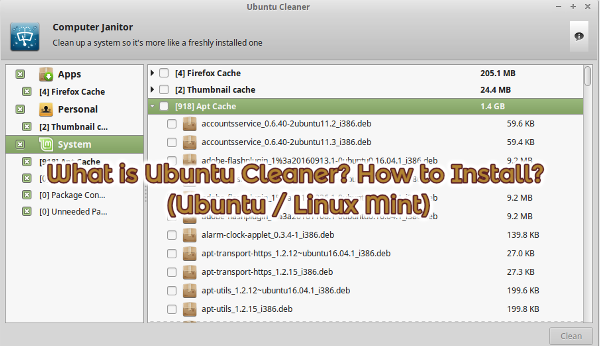
Ubuntu Cleaner is an open source software that removes old kernel files and unused packages on your computer with the remnants of the browser, thumbnails, and applications.

Warning: When you use this kind of software, you should be careful if you do not want to delete files on your computer.

Ubuntu Cleaner Installation (Ubuntu / Linux Mint)

If you want to install Ubuntu Cleaner from deb package, you can download it from here.

How to Mikrotik Monitoring With Cacti

Fadıl

Any interface in the Mikrotik, CPU memory, or queues of the oid to get the settings to verify the SNMP settings, cacti to add Mikrotik template cacti to SNMP v3 with the Mikrotik data will take.

This guide will step you through the process of installing Cacti on an existing VPS (we are using Ubuntu 16.04.2 LTS) and getting a single graph setup for your environment. This is going to assume that the VPS you are installing on has access (both via firewall and via VPN of some kind) to poll devices via SNMP.

Stay in Ubuntu Login Screen

Stay in Ubuntu Login Screen

Fadıl

If you enter your password on the Ubuntu screen and you are likely to fall back to the password screen, your configuration file is damaged. This will be the first and fastest way to reset the config file, but as I always say, resetting without backup can hurt you as much as it can hurt your head.

On the basis of the process, simply follow these steps in order:

  • CTRL + ALT + F2                 (my preference is to use F1 if you want F2)
    

Log in to the drop-down terminal screen. Next step

How to Install Oracle Java 12

How to Install Oracle Java 12

Fadıl

How to Install Oracle Java 12 on Linux?

Run the following commands on the terminal to install Oracle Java.

sudo add-apt-repository ppa:linuxuprising/java
sudo apt-get update
sudo apt-get install oracle-java12-installer

Additional Information: In Ubuntu 18.04 or later, you can skip the “sudo apt-get update” or command. Because the update process is already done after adding the PPA.

If more than one Java version is installed and you want to set Oracle Java 12 as the default, use the following command.

How to Locking And Unlocking User Accounts in Linux?

Fadıl

There may come a time when you need to disable a users login to your Linux box… without deleting there account and still allowing them to receive the email. To do this you must login as “root” and at the command prompt type:

<root@techsoftcenter>:/#"passwd -l username"

(Without the quotes of course) This will lock the users account denying them access to login. You may be thinking “well how do I unlock it now?”, well there’s a command for that too =) At the command prompt type: