Linux Tutorial

How to Install SSH Server on Linux?

Fadıl

In order to make a remote connection with SSH to your computer where the Linux operating system is installed, you need to have the SSH Server computer installed or you need to install it. In general, SSH Server is already installed, but it is not available on some distributors or the service does not start on its own. This is how we set up the ssh server and start the system how it works automatically, we will see now.

Redhat / DNS Server Installation and Configuration on Centos 7 – Bind (Named), NS (Nameserver) – Public DNS Or Private DNS

Redhat / DNS Server Installation and Configuration on Centos 7 – Bind (Named), NS (Nameserver) – Public DNS Or Private DNS

Fadıl

What is DNS? What is NS?

I would like to refer many questions like this to related articles and make a direct transition to this topic.

Note: The domain to be used in the article is fatlan.com, ips are not real.

In Linux systems, you need to install the DNS system and install the Bind package to activate it. The name of the service is known as Named. With Named you can provide service management.

What is NFS (Network File System)? How to Configure NFS Server and User?

What is NFS (Network File System)? How to Configure NFS Server and User?

Fadıl

It is a Unix / Linux file sharing service developed by Sun Microsystems and is a stable technology that enables file sharing between Linux systems.

We need to get into configuration and use it right away. We will work with the Server and Client model in the environment. In other words, we have to configure both the server-side, there are settings that we should not make for the client to use. We will create these applications on the virtual machine.

How to KVM Backup and Restore in Linux

How to KVM Backup and Restore in Linux

Fadıl

By following the steps below, we’ll see how you can upload your KVM virtuals and return them from the backup again.

1. Backup Import

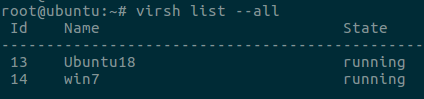
First, let’s list our machines and see that they are operational. To do this, we use the following command.

> virsh list –all

How to KVM Backup and Restore in Linux

Then we close the VM we will install.

> virsh shutdown Ubuntu18

Then let’s list the machines again and see that they are turned off.

How to Install, Configure, and Create a Virtual Machine on Ubuntu

Fadıl

KVM Kernel-based virtual machine is a virtualization application developed for the Linux kernel that converts it to a higher system.

Before installation, login to our server to see if it supports CPU, let’s check the CPU information with the help of the following commands.

The output of this command means  “CPU(s):” 0 does not support if it is 0, and if it is more than 1 or 1, it means it supports.