Publications
Your Mikrotik Router How to Increase the Log Data Size?
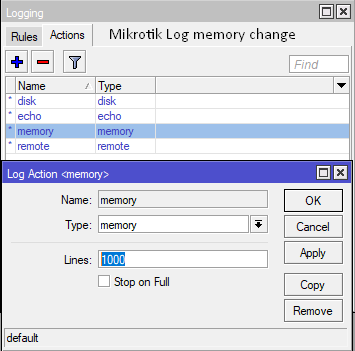
Sometimes you need to look at the logs of the router in order to understand the cause of some malfunctions which also have your router. But we can see that the routers, which are especially dynamic, change snapshots instantly. To better understand, for example, suppose that you provide an internet service provider in a certain region. Here, as seen in the picture section, the default value in Mikrotik devices is limited to 1000 lines. But we Mikrotik from our part of the login device, as well as actions and from there the memory can increase the number of lines, type the number we want instead of 1000. But of course, a very large number of the memory of the device should be careful not to blow up.
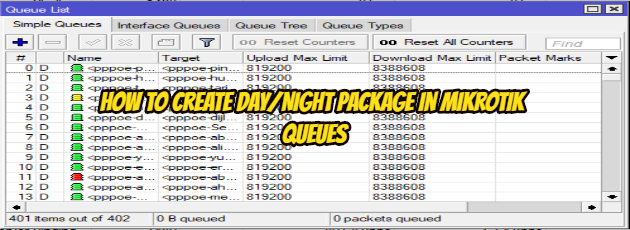
How to Create Day/Night package in Mikrotik Queues
What to do?
1. Create a queue for Day (5MB) and Night (10MB)
2. Create a script for Day (enable Day & disable Night queue) and Night (enable Night & disable Day queue)
3. Create a schedule for Day (8.00 AM=08.00 o’clock) and Night (8.00 PM=20.00 o’clock)
1. Create a queue for Day (5MB) and Night (10MB)
1.1 create queue for Day :
Queue Name: queue_Day
The IP address for Queue: 192.168.1.100 (it's may vary according to you )
Bandwidth : upload =5MB & download=5MB
1.2 Create queue for Night :
Queue Name: queue_Night
The IP address for Queue: 192.168.1.100 (it's may vary according to you )
Bandwidth : upload =10MB & download=10MB
2. Create a script for Day and Night
2.1 Create a Script for Day :
Name: script_Day
Source:/queue simple enable queue_Day
/queue simple disable queue_Night
2.2. Create a Script for Night:
Name: script_Day
Source:/queue simple enable queue_Night
/queue simple disable queue_Day
3. Create a schedule for Day and Night
3.1. Create Schedule for Day:
Name: schedule_Day
Start Time:08:00:00
Interval :1d 00:00:00 or 24:00:00 ; after 1 Day
On event: script_Day; the name of the script that should be run
3.2. Create Schedule for Night
Name: schedule_Night
Start Time:20:00:00
Interval :1d 00:00:00 or 24:00:00 ; after 1 Day
On event: script_Night;  the name of the script that should be run
I hope it has been a useful article.
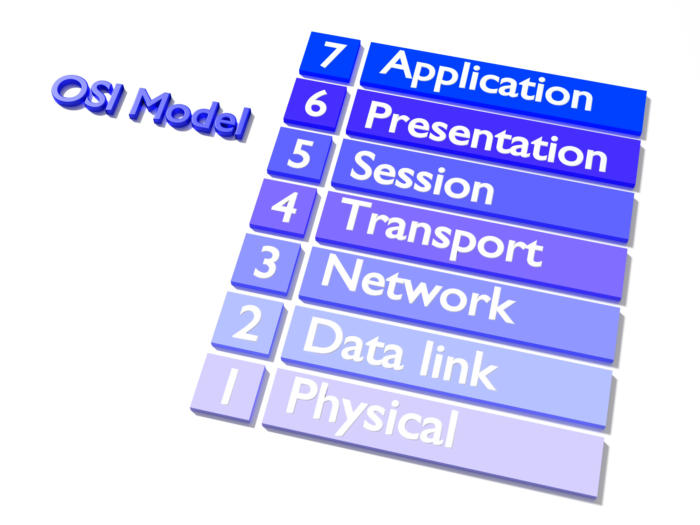
OSI Layers
1-Application Layer
It provides a real interface between the computer application and the network. This layer
the one closest to the user. Only this layer does not provide services to other layers.
The application layer is the program that will use the network service. This layer meets the user’s requirements. For example, a database application or e-mail application, etc. as.
2-Presentation Layer
In the presentation layer, the data is translated. Presentation Layer Sends data to the application layer. In this layer, arrangements are made about the structure and form of the data.
The format of the data in the presentation layer is determined. In addition, the data is encrypted and opened in this layer. In this layer, compression of the data is done.
Relationship between OSI Layers
The task of each layer is to provide service to a higher (higher) layer. Two computers
in the communication between the layers respectively; At the same time, layers at the same level do not directly communicate, but a virtual communication occurs between them.
Figure: Between Two Computers; The relationship between layers real (vertical) and virtual (horizontal)
The data is divided into packets before data is transmitted from one layer to another. The packet is a volume of data used to transfer data from one device to another. Additional information (formatting or addressing) is added to the package in each layer.
The transmission of the data is from the upper layer to the lower layer. Data transmission via cable
by layer. On the other computer, the data that is met by the physical layer first moves to the upper layers.

OSI Models
OSI Model
OSI (Open Systems Interconnection) model ISO (International Standards Organization)
and the way I work between the two computers. First
This standard, which was introduced in 1978, was revised in 1984 and
(Open System Interconnect) as a reference model. Model widely
and has been a guideline for networking.
The OSI Model is specific to any hardware or network. The aim of the OSI network
it provides the use of architects and protocols as a network product business.
ISO standards follow a complex path while maintaining business on the network. ISO standard
the new layer (subroutine). The following seven layers as OSI models are: